
Digital exam platform
Webxam
Run flexible exams in the classroom, remotely, online, offline, or on paper with Webxam. Use it as a standalone exam platform or through FrontCore TMS, with optional proctoring, grading, statistics and AI supported security.
Features
How it works
Benefits
FAQ
Features
How it works
Benefits
FAQ
What is Webxam?
Webxam is an end-to-end examination platform for training providers and institutions that need flexible, secure and scalable exam delivery.
Use it to manage the full exam lifecycle, from question creation and exam setup to candidate management, delivery, grading, statistics and follow up.


exams administered
tests delivered annually
question types supported
Why flexible exam delivery?
Some exams work best digitally in a classroom. Others need to be completed remotely. Some require offline delivery, lockdown mode, or even paper based exams with scanning and digitisation.
Webxam gives you the flexibility to run simple tests, formal exams, secure online exams, hybrid exams, and paper based exams, depending on what your training business needs.


Reduce paper handling where you can, keep paper based workflows where you need them, and add security features such as candidate identification, screen and video recording, live proctoring and suspicious behaviour flagging when the exam requires it.
Offer a better exam experience without losing control.
Webxam exam features
Digital exams
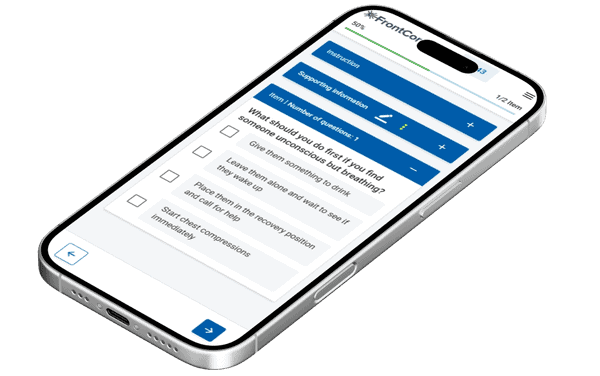
Run exams in the classroom, remotely, online, offline or in hybrid formats. Webxam supports everything from simple tests to more formal exam setups.
Advanced question types
Build exams with a wide range of question types, including multiple choice, matching, gap fill, essay, file upload, audio and video responses, with support for computer adaptive testing (CAT).
Automated, AI & manual grading
Use automated grading and AI correction for free text and spoken answers, with manual grading when human assessment is needed.
Candidate identification
Use AI based identification, face recognition and manual identification to help confirm that the right participant is taking the exam.
Proctoring – live & recorded
Candidate registration & management
Automated exam communication
Detailed exam statistics
Get detailed exam statistics, including scoring, candidate activity, and performance patterns, so you can improve both exams and follow up.
Delivery modes
Deliver exams through browser based access, offline exam servers, secure lockdown mode, BYOD, tablet based delivery, mobile access, or hybrid paper and digital workflows.
Paper-based exams
Print exams and use paper exam scanning and digitisation to evaluate paper responses. Useful when paper exams are required, but you still want faster grading and follow up.
Results in FrontCore
When Webxam is used through FrontCore TMS, exam results can be shown directly in the participant list, giving your team a clear overview without jumping between systems.
There’s more…
Webxam is a feature rich exam platform with more options than we can show here. Contact us and we’ll walk you through the complete feature list.
How Webxam works
Prepare the exam
Create new or import existing questions, create exam templates, choose your delivery mode and security level and assign candidates to the exam.
Give candidates access
Give candidates access to their assigned exams through Webxam. When Webxam is used through FrontCore TMS, participants can access their exams from FrontCore My Page.
Run the exam
Candidates take the exam in the mode you set: In the classroom or remotely, in the open or secured browser, offline or on paper. Whichever way it is taken, every response ends up in the same candidate record.
Keep the exam secure
Use AI based or manual candidate identification, optional screen and video recording and AI-based or live proctoring where needed.
Grade more efficiently
Use automatic grading, AI supported correction, and manual assessment depending on the question type.
Follow up results
Review exam results and statistics in Webxam. When used through FrontCore TMS, results can also be followed up directly from the participant list.
Benefits of using Webxam
Save time before, during, and after the exam
Spend less time on manual routines, grading, paper handling, scanning and result follow up.
Make exams easier for participants
Let candidates take exams in the format that fits the course, whether that is digital, remote, offline, locked down or paper based.
Keep exam quality consistent
Use a more consistent exam process across courses, locations and formats, whether you run simple tests, secure exams, hybrid exams or paper based assessments.
Reduce uncertainty around exam integrity
Choose security settings that fit the exam, from simple access control to candidate identification, lockdown mode, screen recording, proctoring and activity monitoring.
Follow up faster
Review results and exam statistics more efficiently, so your team can quickly see who passed, who needs follow up and where support may be needed.
Scale without adding more admin
Run more tests and exams across different formats without increasing the manual workload at the same pace.
Who is it for?
Webxam is made for training providers and institutions looking for secure, flexible exam software that supports tests, exams and assessments across different formats. It is especially relevant for:
Training providers with classroom exams
Run digital exams in person, reduce paper, simplify grading, and keep results organised in FrontCore.
Certification training providers
Run auditable certification exams across regions, with traceability, advanced proctoring, automatic grading, detailed exam logs and faster result follow up with our certification exam software.
Training providers with remote exams
Let participants take e-assessments from another location, with optional security settings such as candidate identification, screen recording, live proctoring and suspicious behaviour flagging.
Compliance training providers
Use Webxam as an assessment tool to test knowledge, document results and support secure online exams for compliance training.
Training providers with mixed course formats
Use the same digital exam solution whether your training is delivered in person, remotely, or as a combination of both.
Language and skills training providers
Use written, spoken, audio, video and file based answers for skills testing, placement tests and language proficiency tests aligned with CEFR levels.
Training providers who need simple digital tests
Use Webxam without advanced proctoring when you need a flexible solution for tests and exams that do not require extra security measures.
Training providers with paper based exams
Use paper exams when needed, then scan completed answer sheets so responses can be digitised, evaluated and followed up more efficiently.
Organisations with existing testing software
Use Webxam Proctoring alongside your current testing software to add secure remote exam monitoring without replacing your existing exam setup.
FAQs
Is Webxam a standalone product or part of FrontCore TMS?
Can we control how strict the exam security should be?
Can we use Webxam Proctoring only?
Can our team still review answers manually?
Is Webxam GDPR compliant, and where is data hosted?
Can Webxam support paper based exams?
Is Webxam suitable for high stakes exams?
How do we get started?
Do candidates need to install anything?
Can Webxam integrate with other systems?
Have a question? We’re here to help
See how Webxam fits your exams
Request a demo and we’ll get back to schedule a time that suits you. In a tailored walkthrough, you’ll see how Webxam can support your exam process, from setup and delivery to grading, security and follow up.
